Kubernetes Probes Configuration Guide
This repository contains the Kubernetes Deployment configuration featuring Startup, Readiness, and Liveness probes for the Node.js application (sachinthokal/k8s_probes_app:v1).
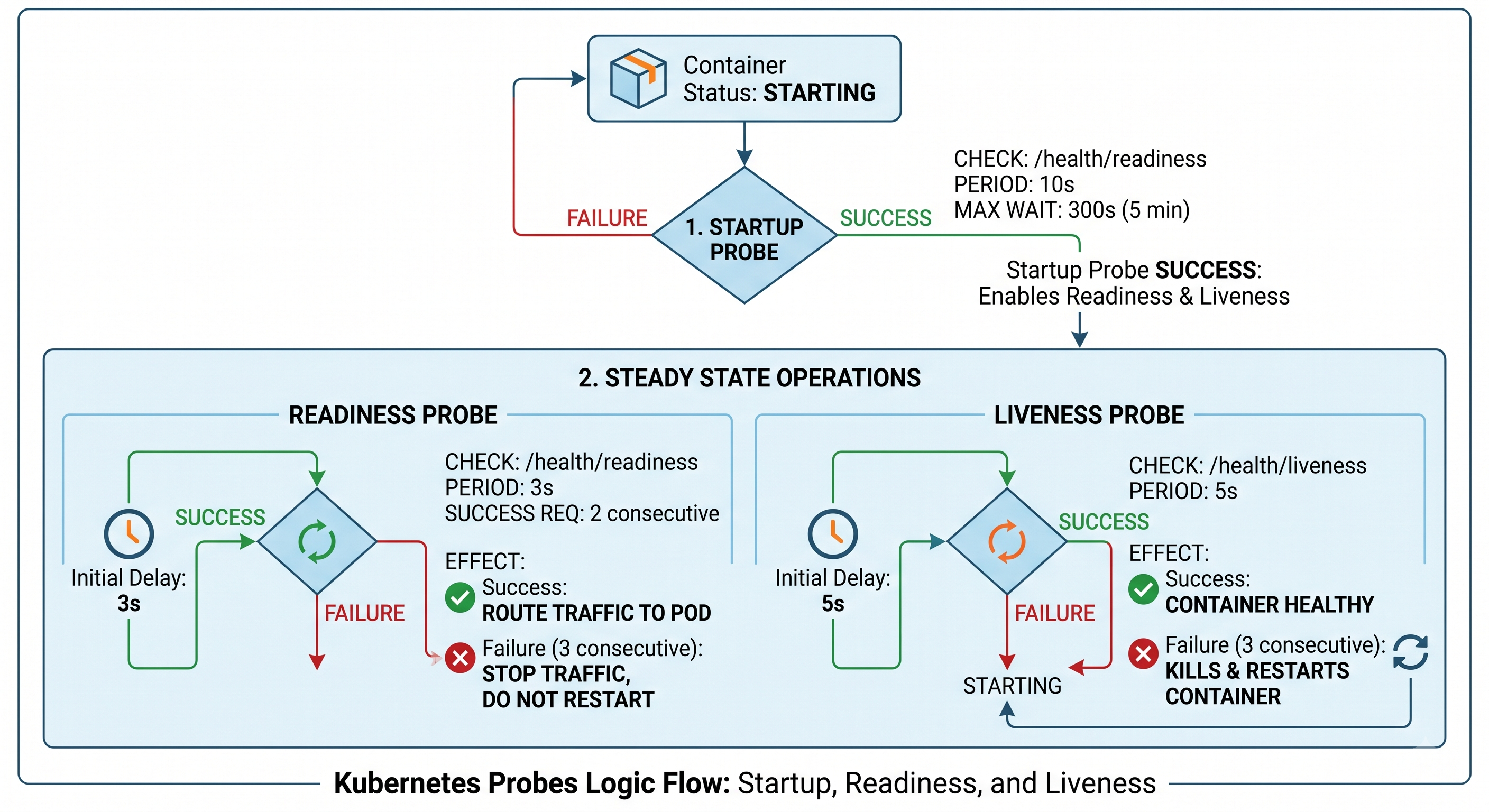
🛠 Deployment Manifest (deployment.yaml)
kind: Deployment
apiVersion: apps/v1
metadata:
  name: probs-deployment
  namespace: probs-ns
spec:
  replicas: 1
  selector:
    matchLabels:
      app: probs-app
  template:
    metadata:
      labels:
        app: probs-app
    spec:
      containers:
        - name: probs-container
          image: sachinthokal/k8s_probes_app:v1
          ports:
            - containerPort: 3000

          # 1. STARTUP PROBE
          startupProbe:
            httpGet:
              path: /health/readiness
              port: 3000
            periodSeconds: 10
            failureThreshold: 30

          # 2. READINESS PROBE
          readinessProbe:
            httpGet:
              path: /health/readiness
              port: 3000
            initialDelaySeconds: 3
            periodSeconds: 3
            failureThreshold: 3
            timeoutSeconds: 2
            successThreshold: 2

          # 3. LIVENESS PROBE
          livenessProbe:
            httpGet:
              path: /health/liveness
              port: 3000
            initialDelaySeconds: 5
            periodSeconds: 5
            failureThreshold: 3
            timeoutSeconds: 2
            successThreshold: 1
🔍 How Probes Work in This Configuration
1. startupProbe (Boot-up Protection)
- Goal: Gives the application time to perform initial startup (e.g., loading cache, DB connections).
- Behavior: Checks
http://<pod-ip>:3000/health/readinessevery 10 seconds (periodSeconds). - Max Timeout: Allows up to 30 failures (
failureThreshold).10s × 30 = 300 seconds (5 minutes). - Key Rule: Both Readiness and Liveness probes remain DISABLED until the Startup probe succeeds.
2. readinessProbe (Traffic Routing)
- Goal: Determines if the Pod is ready to accept incoming user network traffic.
- Behavior: Starts 3 seconds after the startup probe succeeds (
initialDelaySeconds), checking/health/readinessevery 3 seconds (periodSeconds). - Timeout: Expects an HTTP response within 2 seconds (
timeoutSeconds). - Success Rule: Requires 2 consecutive successful checks (
successThreshold: 2) before marking the Pod asREADY. - Failure Rule: If it fails 3 consecutive times (
failureThreshold: 3), Kubernetes stops routing traffic to this Pod (Removes it from Service Endpoints). The container is NOT restarted.
3. livenessProbe (Container Health & Auto-Healing)
- Goal: Detects if the application is deadlocked or frozen and needs a restart.
- Behavior: Starts 5 seconds after the startup probe succeeds (
initialDelaySeconds), checking/health/livenessevery 5 seconds (periodSeconds). - Timeout: Expects an HTTP response within 2 seconds (
timeoutSeconds). - Success Rule: Marks healthy on 1 successful response (
successThreshold: 1). - Failure Rule: If it fails 3 consecutive times (
failureThreshold: 3), Kubernetes considers the container dead and KILLS & RESTARTS the container automatically.
🚀 How to Deploy and Verify
1. Create Namespace & Deploy
kubectl create namespace probs-ns
kubectl apply -f deployment.yaml
2. Check Deployment Status
kubectl get pods -n probs-ns -w
3. Inspect Probe Events & Logs
# Detailed events and probe failures
kubectl describe pod <pod-name> -n probs-ns

# Stream real-time logs
kubectl logs -f deployment/probs-deployment -n probs-ns